
September 5 2008
Cocoa Tutorial: iTunes Link Arrows
iTunes has small horizontal arrow icons integrated into many interfaces, in Music, Podcasts, and the Store. They’re in other applications too, such as Instruments and Delicious Library. The HIG briefly touches on these arrows but doesn’t name them, so I call them link arrows, if only to distinguish them from arrow keys.

I did a quick Google search for hints on how to recreate these in Cocoa, but only found lots of posts from 2004 on changing their behavior in iTunes. Oddly, that tip was rediscovered a couple days ago.
Fortunately, the link arrows aren’t difficult to wire up in Interface Builder. Just drop an NSTableView object into your NIB and then drop an NSButtonCell onto the column where you’d like the link arrow to appear. Configure its Attributes as shown below. Be sure to associate the cell’s selector with an action. Populate the table, and the arrows should appear on the right side of the column.
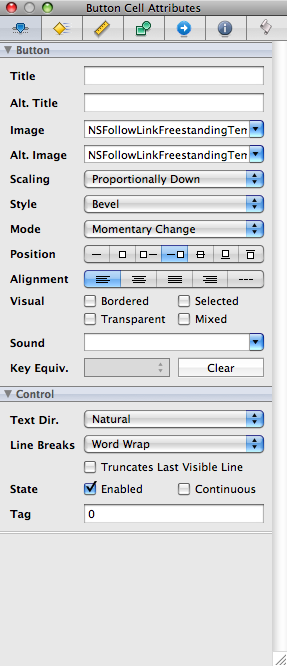
Of course, if you’d prefer using Cocoa and Xcode, you can subclass NSButtonCell and add the following lines to the init method.
// snippet from BDLinkArrowCell.m //

[self setButtonType:NSSwitchButton];
[self setBezelStyle:NSSmallSquareBezelStyle];
[self setImagePosition:NSImageRight];
[self setBordered:NO];
[self setImage:[NSImage imageNamed:NSImageNameFollowLinkFreestandingTemplate]];
[self setAlternateImage:[NSImage imageNamed:NSImageNameFollowLinkFreestandingTemplate]];
[self setTarget:self];
[self setAction:@selector(clickedLinkArrow:)];

