bdunagan
fill the void

Posted
6 December 2008 @ 5pm

Tagged
development

14 Comments

NSProgressIndicator in NSTableView or NSOutlineView
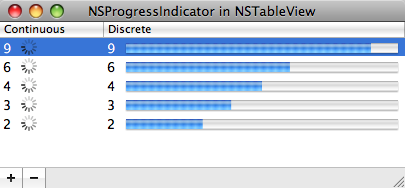
Spinning wheels (NSProgressIndicator objects in Cocoa) are a common UI element in, well, all software these days. People like to know if applications are busy doing something and, if so, how much longer they’ll be. Web browsers, for instance, have continuous spinning wheels to indicate that they’re still downloading the requested page and discrete progress bars to show how much of a file they’ve already downloaded.

In Cocoa, NSProgressIndicator is easily placed into an NSView using Interface Builder, but embedding the object in a list (NSTableView or NSOutlineView) takes a bit of coding. CocoaDev discusses it, but I thought I’d throw together a simple project demonstrating it, pictured above. It’s available on Google Code and as a zipped file (Xcode 3.1).


14 Comments

Posted by
nick
7 August 2009 @ 11am

I’ve been looking for an elegant way to implement progress indicators in an NSCell for an app I’m working on. This is definitely the cleanest way I’ve seen yet. Nice work.


Posted by
bdunagan
7 August 2009 @ 10pm

Glad you found it useful!


Posted by
Vijay Swami
13 August 2009 @ 11pm

Thanks a ton dear! You have saved hours of time for me.. now this is the real contribution to the world..nice work! Please keep helping people like me who switch to mac from windows..:)


Posted by
Simon Ward
13 September 2009 @ 4pm

Very clean and tidy code. If only all code examples could be as clear as this.
I like it very much!


Posted by
Simon Ward
13 September 2009 @ 9pm

Can it be done with bindings instead of a datasource?


Posted by
fill the void – Syncing Arrows in iTunes
25 September 2009 @ 10pm

[...] Cocoa object; those objects only display the spinning lines for isIndeterminate:YES (see my NSProgressIndicator example from last year). Instead, that nice UI feedback is created through home-brewed [...]


Posted by
bdunagan
11 October 2009 @ 11am

You can make bindings work in this case, but I still find I need to compose the progress into the model rather than into the cell. The problem with cell composition is there is only one progress object because of cell reuse, and multiple cells try to draw it at the same time. Please post a comment if you know how to do it. Thanks!


Posted by
Vladimir Solomenchuk
24 January 2010 @ 4pm

If you remove row, progress still remains in table. You have make own tableview with redefined reloadData method with code something like this

while ([[list subviews] count] > 0)
{
[[[list subviews] lastObject] removeFromSuperviewWithoutNeedingDisplay];
}


Posted by
cristik
26 January 2010 @ 7am

Thanks a lot for this solution. I managed to use bindings and added a UI category to the data model, so the MVC design is still in place.


Posted by
Tristan
8 January 2011 @ 9am

I’ve just noticed, when you have about 10 of these in a
table view at once, their animation performance is rather bad.
Sometimes, it seems as if an entire frames are skipped. What could
I do about that, since I’d like to let the user have nice-looking
progress bars, not choppy ones that they’ll get angry at ;)


Posted by
bdunagan
8 January 2011 @ 10am

@Tristan Completely agree. I’ve meant to update that code for years, but still haven’t gotten around to it. I’ll take a look at it soon.


Posted by
Tristan
8 January 2011 @ 10am

I’m actually implementing this in a downloads window, so I probably won’t have more than 4 or 5 showing at once for the average user, but I’m worried about the crazy people that want to download 20 things at once from my server. I was thinking of doing the thing that the table views do with their data, and loading it lazily, as in removing the progress bars when they are not visible, or at least not having them re-draw and waste cycles, and only drawing the ones that are actually visible. Possibly a custom table view subclass to handle that, or could a delegate be useful in this case?

But besides the rather obvious issues that every code has, I love you for this. Saved me quite some time trying to code my own cell subclass.


Posted by
Jonathan
17 August 2011 @ 2pm

You have a retain cycle on BDObjects in the code. Easily broken by invalidating the timer, not in dealloc, but just before the BDObject is removed from the objects array.

It was news to me that timers retain both their object arguments.

http://developer.apple.com/library/mac/#documentation/Cocoa/Reference/Foundation/Classes/NSTimer_Class/Reference/NSTimer.html


Posted by
bdunagan
18 August 2011 @ 10am

@Jonathan Ah, thanks for pointing that out.


Leave a Comment