
December 7 2008
PackageMaker tips
At work, we're using Apple's built-in PackageMaker in our automated nightly builds to produce installer packages. The command-line version is very handy as we can incorporate it into scripts run every night with launchd, and for complicated package specs, the GUI version can save off a pmdoc bundle (a collection of XML files) that the command-line version can use. Still, we've run into two issues to keep in mind when using PackageMaker.
Relocation
Coming from Windows, Mac OS X's ability to go "find" files scattered around the hard drive is magic. (No, I don't count COM.) Installers can upgrade an application bundle even if it's not in /Applications. Amazingly neat. And horribly frustrating if you're unaware the installer can do that. We have an application bundle and System Preferences pane bundle with the same name, and for a bit, we were scratching our heads over why the application installer kept "upgrading" the System Preferences pane when we wanted it to just place the bundle in /Applications.
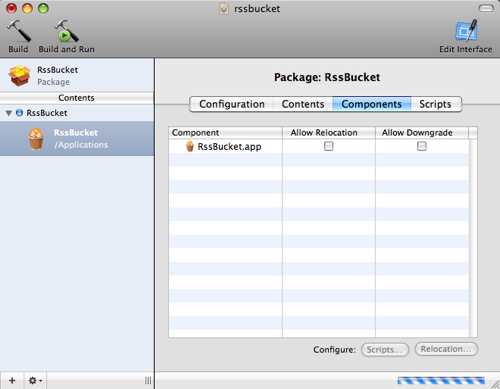
The issue was PackageMaker's default. By default, it relocated the bundle it was installing to wherever a previously installed bundle by the same name was. So, an RssBucket installer would replace RssBucket.app (or RssBucket.prefPane), not just if it was in /Applications but anywhere on the file system. Apple's Console application (/Applications/Utilities/) can show you what the installer package actually did in installer.log; search for "diverting" for relocation issues. Unchecking "Allows Relocation" in the PackageMaker GUI disables this feature.
Upgrading
PackageMaker has another interesting default. When the GUI creates a pmdoc bundle, it caches each component's version in the XML file. It's a strange default because when you use the pmdoc in the command-line PackageMaker, the created installer still has that cached version. So, when used in a nightly build with agvtool incrementing the build, the created installer has the version of the application used to create the pmdoc bundle, not the version of the supplied application bundle. Result: On the third day, the installer fails to upgrade. install.log says, "Application (version 1.0.0.1) was not installed because a newer version (1.0.0.2) already exists." (I can't remember if the second day works because the versions match.)
<component id="com.bdunagan.rssbucket" path="/Users/bdunagan/rssbucket/RssBucket.app" version="1.0">
	<mod>isRelocatable</mod>
</component>
Simply removing the version from the XML file in the pmdoc bundle solves this problem. The installer instead relies on Info.plist to determine the version. Caching the version is an odd default, but luckily, it's easily fixed.


