
April 16 2009
Tips for Xcode and Interface Builder
Just a couple hints for working in Xcode and Interface Builder.
Xcode
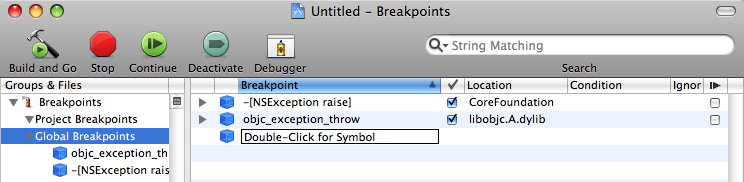
objc_exception_throw: Let's say I've done a perfect job handling exceptions in my application. All the statements that might throw are wrapped in a @try/@catch block. But I get an "unrecognized selector" error in the console, and I have no idea where it came from. Fortunately, Xcode (or really, gdb) lets me put a breakpoint in the exception throw. I simply add objc_exception_throw and -[NSException raise] (on pre-10.5 systems) as breakpoints to Xcode, and I can drag them into the "Global Breakpoints" section to have them active in every project. See Apple's Mac OS X Debugging Magic for more pointers.
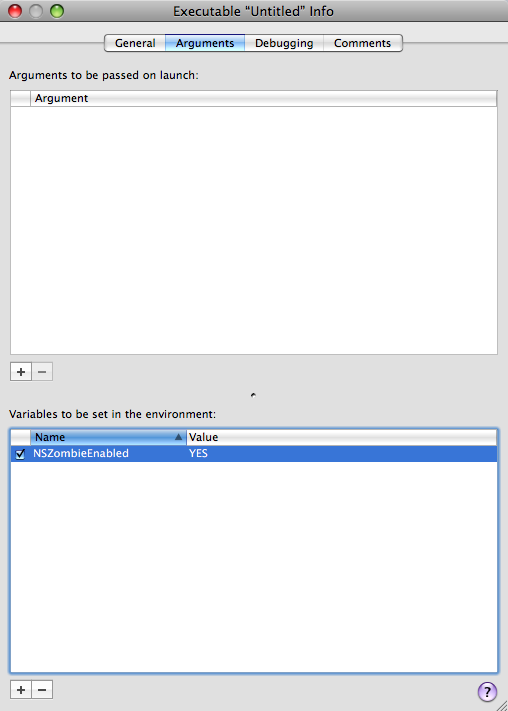
NSZombie: A bit ago, my application started crashing at random times. After hunting around, I finally decided I was deallocating an instance variable but then using it later. This sort of bug is difficult to track down, which is why NSZombie is so handy. Add "NSZombieEnabled" = "YES" as an argument to an executable, and no memory is ever released; a final release turns an object into an NSZombie, and from then on, any messages sent to it result in a helpful log in the console: "...message sent to deallocated instance...". Of course, leaving that flag on means the application never releases memory, so don't ship with it. For more information, read CocoaDev's NSZombieEnabled page.
Selectors: Selectors are a funny thing. When I have a generic NSObject, I don't always know whether it will respond to a given selector. Perhaps that's why Cocoa has respondsToSelector: and performSelector:. Sending a selector to an object that doesn't understand it results in bad things, so testing and sending a selector in a generic fashion is quite nice. And one more thing, when specifying a selector, capitalization and punctuation matter. The selector for - (void)doThis:(id)obj1 andThat:(id)obj2; must be @selector(doThis:andThat:) whereas - (void)doOtherThing; becomes @selector(doOtherThing)
Keyboard Shortcuts: Two handy shortcuts. Option-doubleclick on a piece of text to look it up in Xcode Documentation, and Command-doubleclick to look up its header.
Interface Builder
Keyboard Shortcuts: Another two good shortcuts. Holding Control-Shift when clicking on an element shows a hierarchy of all the elements under the cursor. And, holding Option while an element is highlighted gives the element's layout coordinates.
NSSplitView: Random experimentation lead to this. I found I can make a 3+ split view by just copying and pasting the individual views while in tree mode. The view will update automagically.


