
October 30 2011
EC2 SSH on the iPad with Panic Prompt

Update: EC2 SSH on the iPhone with Panic Prompt
Back in April, Panic shipped a beautiful SSH app for iPhone and iPad: Prompt. Quite a few comments on that announcement blog post concerned EC2. Many people wanted to SSH into their Amazon cloud, but they couldn’t figure out the keypair situation. A day later, Joe Cheng covered steps that worked for him. Unfortunately, his steps didn’t work for me. Here is what I did:
- Buy Prompt. I'm using v1.2.2.
- Find your keypair file. This is not the .pem file. This is the one you use to SSH into your instances without a password: ssh -i path/to/keypair_file name@ip_address.
- Duplicate that keypair file. I named it aws.
- Look at the duplicated file. Mine contained the key signature as the first line. (See below.) Remove the key signature. Prompt doesn't like it.
KEYPAIR keypair-name 12:34:56:78:90:12:34:56:78:90:12:34:56:78:90:12:34:56:78:90 -----BEGIN RSA PRIVATE KEY----- ...key... -----END RSA PRIVATE KEY----- - Sync your iOS device with iTunes, click on "Apps", scroll down, and find "File Sharing".
- Click on Prompt in the list of apps, click "Add...", select the duplicate keypair file (aws), and add it.
- Sync your iOS device again to transfer the files over.
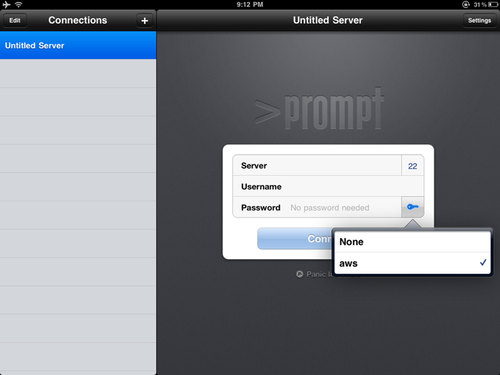
- Launch Prompt. You'll see a little key icon next to "Password". Tap it.
- As soon as you tap the key icon, you should see a list of keys (and not the yellow popup). My list has "None" and "aws". Looking back at iTunes, you'll notice the keypair file is no longer listed in "Prompt Documents".
- No need to worry about generating a public key with ssh-keygen.
As a bonus, I found this great tip on using screen to create or reattach to a terminal session: screen -DDRS ios.


