
Remind Me Later

Remind Me Later adds events to iCal in two clicks. Type “Buy groceries at 4pm tomorrow”, and it will add “Buy groceries” to iCal at 4pm tomorrow. Download from the Mac App Store or here.
 Instant Events. In two clicks. Opening iCal takes time. Add an event in two clicks. Click on the menu bar. Type in a reminder. Click “Add Event”. Done.
 Seamless iCal integration. Remind Me Later integrates perfectly with iCal. Add a reminder, and it shows up instantly in iCal.
 Just type. Type what you’re thinking. Just like “Quick Add” in Google Calendar, Remind Me Later figures out what you mean. Naturally.
 Sync to your iPhone with MobileMe. With iCal and MobileMe, events automatically sync across your devices. Save a reminder. See it on your iPhone, iPad, or iPod touch.
- Mac OS X Leopard (10.5)
- Mac OS X Snow Leopard (10.6)
- Mac OS X Lion (10.7)
- Intel-based Macs
Apple, iCal, iSync, and MobileMe are trademarks of Apple Inc., registered in the U.S. and other countries. Google and Google Calendar are trademarks of Google Inc., registered in the U.S. and other countries.
CalDAV Delegate Support
iCal allows you to add a Google Calendar account and then include secondary calendars as delegates. However, iCal does not include these delegates when other applications ask for the calendar list (via Apple’s CalendarStore framework), so the calendars don’t show up in Remind Me Later’s calendar list.
An easy workaround is adding these delegate calendars as individual accounts in iCal. Just go into iCal’s Preferences, add an account, and fill out the form as shown below. You can find the calendar’s 26-character ID in Google Calendar’s Settings tab.
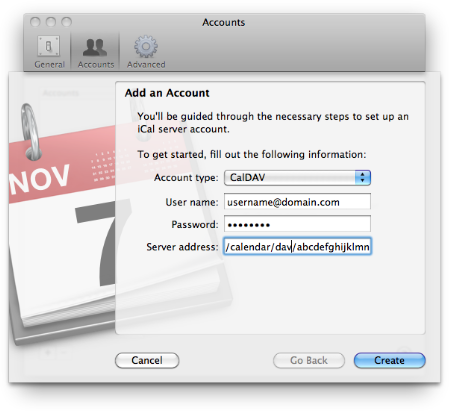
# Add an Account
Account type: CalDAV
User name: username@domain.com
Password: ••••••••
Server address: https://www.google.com/calendar/dav/calendar_id@group.calendar.google.com/user/

