
November 10 2008
Cocoa Tutorial: Source List Badges, Part 2
2010-01-25 Update: Perspx has a far better implementation of source list badges as part of his PXSourceList project.
So close but not quite. My original post on source list badges contained code that produced almost the desired result. First off, Ken Orr pointed out that the correct font is Helvetica. That fixed the font, but look at the colors in the screenshots.
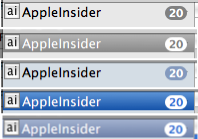
Clearly, the final image just looks wrong. The badge's text color is bright blue, rather than subtle blue. I couldn't figure out how to identify a defocused NSTableView last time, but tonight I finally found the correct call at CocoaDev. It utilizes NSResponder to see whether the NSTableView is in focus or not. So that enabled me to fix the color issues. Check out the actual implementation below and feel free to use it wherever.
// Subclass of NSTextFieldCell
@implementation BDBadgeCell
// Initialize badge variables, based on Apple Mail.
static int BADGE_BUFFER_LEFT = 4;
static int BADGE_BUFFER_SIDE = 3;
static int BADGE_BUFFER_TOP = 3;
static int BADGE_BUFFER_LEFT_SMALL = 2;
static int BADGE_CIRCLE_BUFFER_RIGHT = 5;
static int BADGE_TEXT_HEIGHT = 14;
static int BADGE_X_RADIUS = 7;
static int BADGE_Y_RADIUS = 8;
static int BADGE_TEXT_MINI = 8;
static int BADGE_TEXT_SMALL = 20;
static int ICON_WIDTH = 16;
static int ICON_HEIGHT_OFFSET = 2;
- (void)setBadgeCount:(int)newBadgeCount
{
badgeCount = newBadgeCount;
}
- (void)setIcon:(NSImage *)newIcon
{
[newIcon retain];
[icon release];
icon = newIcon;
[icon setFlipped:YES];
}
- (void)drawInteriorWithFrame:(NSRect)aRect inView:(NSView *)controlView
{
// Set up badge string and size.
NSString *badge = [NSString stringWithFormat:@"%d", badgeCount];
NSSize badgeNumSize = [badge sizeWithAttributes:nil];
NSFont *badgeFont = [NSFont fontWithName:@"Helvetica-Bold" size:11];
// Calculate the badge's coordinates.
int badgeWidth = badgeNumSize.width + BADGE_BUFFER_SIDE * 2;
if (badgeNumSize.width < BADGE_TEXT_MINI)
{
// The text is too short. Decrease the badge's size.
badgeWidth = BADGE_TEXT_SMALL;
}
int badgeX = aRect.origin.x + aRect.size.width - BADGE_CIRCLE_BUFFER_RIGHT - badgeWidth;
int badgeNumX = badgeX + BADGE_BUFFER_LEFT;
int badgeY = aRect.origin.y + BADGE_BUFFER_TOP;
if (badgeNumSize.width < BADGE_TEXT_MINI)
{
badgeNumX += BADGE_BUFFER_LEFT_SMALL;;
}
NSRect badgeRect = NSMakeRect(badgeX, badgeY, badgeWidth, BADGE_TEXT_HEIGHT);
// Draw the badge and number.
NSBezierPath *badgePath = [NSBezierPath bezierPathWithRoundedRect:badgeRect xRadius:BADGE_X_RADIUS yRadius:BADGE_Y_RADIUS];
BOOL isWindowFront = [[NSApp mainWindow] isVisible];
BOOL isViewInFocus = [[[[self controlView] window] firstResponder] isEqual:[self controlView]];
BOOL isCellHighlighted = [self isHighlighted];
if (isWindowFront && isViewInFocus && isCellHighlighted)
{
[[NSColor whiteColor] set];
[badgePath fill];
NSDictionary *dict = [[NSMutableDictionary alloc] init];
[dict setValue:badgeFont forKey:NSFontAttributeName];
[dict setValue:[NSColor alternateSelectedControlColor] forKey:NSForegroundColorAttributeName];
[badge drawAtPoint:NSMakePoint(badgeNumX,badgeY) withAttributes:dict];
}
else if (isWindowFront && isViewInFocus && !isCellHighlighted)
{
[[NSColor colorWithCalibratedRed:.53 green:.60 blue:.74 alpha:1.0] set];
[badgePath fill];
NSDictionary *dict = [[NSMutableDictionary alloc] init];
[dict setValue:badgeFont forKey:NSFontAttributeName];
[dict setValue:[NSColor whiteColor] forKey:NSForegroundColorAttributeName];
[badge drawAtPoint:NSMakePoint(badgeNumX,badgeY) withAttributes:dict];
}
else if (isWindowFront && isCellHighlighted)
{
[[NSColor whiteColor] set];
[badgePath fill];
NSDictionary *dict = [[NSMutableDictionary alloc] init];
[dict setValue:badgeFont forKey:NSFontAttributeName];
[dict setValue:[NSColor colorWithCalibratedRed:.51 green:.58 blue:.72 alpha:1.0] forKey:NSForegroundColorAttributeName];
[badge drawAtPoint:NSMakePoint(badgeNumX,badgeY) withAttributes:dict];
}
else if (!isWindowFront && isCellHighlighted)
{
[[NSColor whiteColor] set];
[badgePath fill];
NSDictionary *dict = [[NSMutableDictionary alloc] init];
[dict setValue:badgeFont forKey:NSFontAttributeName];
[dict setValue:[NSColor disabledControlTextColor] forKey:NSForegroundColorAttributeName];
[badge drawAtPoint:NSMakePoint(badgeNumX,badgeY) withAttributes:dict];
}
else
{
[[NSColor disabledControlTextColor] set];
[badgePath fill];
NSDictionary *dict = [[NSMutableDictionary alloc] init];
[dict setValue:badgeFont forKey:NSFontAttributeName];
[dict setValue:[NSColor whiteColor] forKey:NSForegroundColorAttributeName];
[badge drawAtPoint:NSMakePoint(badgeNumX,badgeY) withAttributes:dict];
}
// Draw icon.
NSRect iconRect = aRect;
iconRect.origin.y = ICON_HEIGHT_OFFSET;
iconRect.size.height = ICON_WIDTH;
iconRect.size.width = ICON_WIDTH;
[icon drawInRect:iconRect fromRect:NSZeroRect operation:NSCompositeSourceOver fraction:1.0];
// Draw text.
NSRect labelRect = aRect;
labelRect.origin.x += ICON_WIDTH;
labelRect.size.width -= badgeWidth;
[super drawInteriorWithFrame:labelRect inView:controlView];
}
@end

